
Dynomate 1.9.0
Released January 19, 2026 (
Multi-select rows, delete them in bulk, truncate entire tables, and do it all faster with new keyboard shortcuts. We've also squashed some annoying bugs that were getting in the way of a smooth editing experience.
Multi-Row Selection
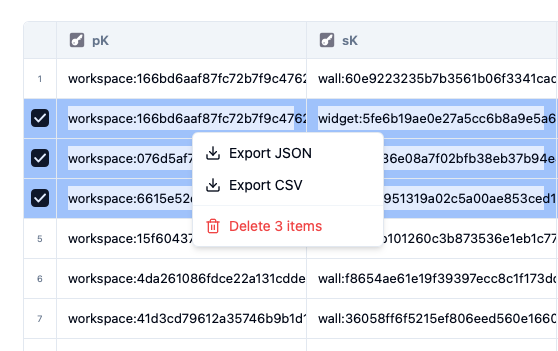
You've been asking for this one. Select multiple rows in your table using checkbox markers, then act on all of them at once through the context menu. Export to JSON or CSV, or delete them in bulk.
The selection state persists per tab and respects whether you're in scan or query mode, so switching between views won't lose your work.
Truncate Table
Sometimes you need to wipe a table clean. Maybe it's a dev environment full of test data, maybe you're resetting state before a fresh import. Whatever the reason, you can now truncate tables directly from the toolbar.
We've built this with the appropriate amount of caution: there's a confirmation dialog (because deleting everything shouldn't be a one-click accident), progress tracking so you can see it working, and cancel support if you change your mind mid-operation. The deletion runs in the background, so you're not stuck watching a spinner.
Keyboard Navigation & Shortcuts
We've added proper keyboard shortcuts for table selection: Cmd/Ctrl+A to select all rows, Cmd/Ctrl+click to toggle individual rows, and Shift+click for range selection. It's the same muscle memory you have from every other tool, now working in Dynomate.
We've also added a shortcut button in the titlebar that opens a dialog showing all available keyboard shortcuts.
Cleaner Inline Editing
Previously, if you made a typo while editing a cell, the error message would stick around even after you fixed it. Parse errors and update errors are now clear as you edit, and the table refreshes automatically after successful updates.
Context Menu Positioning
The right-click context menu used to appear with weird padding that made it feel disconnected from the row you clicked. It now anchors precisely to the clicked row. Small fix, but it makes the interaction feel more direct.
Table Header Visibility
When you focused or selected a table header, the text would sometimes disappear against the background. This is now fixed.