Dynomate 1.14.0
Released April 24, 2026 (
Import data into any DynamoDB table from JSON, CSV, S3, or another DynamoDB table. Preflight validation catches problems before a single item is written.
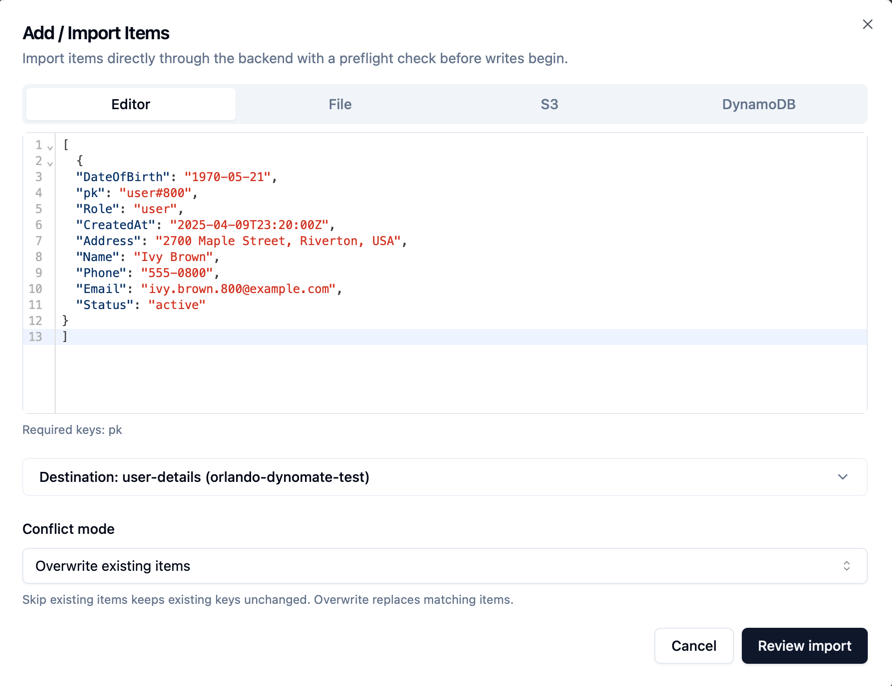
Add / Import Items
No more throwaway scripts to get data into DynamoDB. Click + on any table and pick your source: paste JSON in the Editor, choose a local .json or .csv file, point to an S3 object, or pull items straight from another DynamoDB table.
Source and destination can use different AWS profiles, so you can import from an S3 bucket or DynamoDB table in one account into a table in another. Cross-account seeding without the ceremony.
Before anything touches your table, a preflight check validates structure, key attributes, and duplicate keys. You'll know what's wrong before a single item is written.
Choose "Overwrite existing items" to replace matching keys, or "Skip existing items" to leave existing records untouched. The import panel tracks items processed, written, skipped, and failed in real time.
Variables in Profile & Table ARN Fields
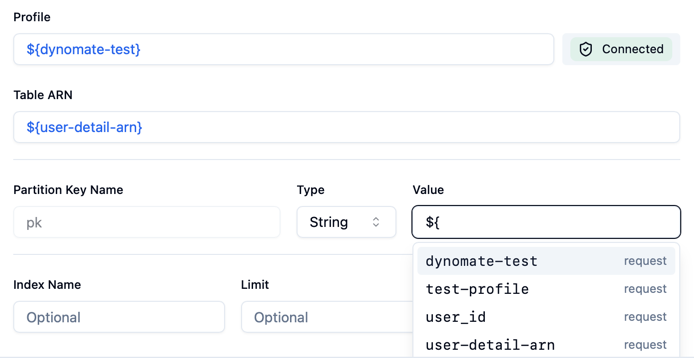
The Profile and Table ARN fields in request collections now support variables. Define profile_name or table_arn in your environment variables, reference them in your request, and run the same query against staging, production, or your teammate's account by switching environments. No more duplicating requests just to hit a different table.
Variable Autocomplete & Syntax Highlighting
Variables in the request builder are now colour-coded, so you can tell at a glance where a variable is being used versus a literal value. Start typing ${ and autocomplete suggests matching variables from your environment. Less typo-hunting, fewer failed queries from a misspelled variable name.